Key takeaways
- Looking for a Moovly alternative? Skiddee is worth trying for narrated illustrated explainers, educational videos, and faceless stories built from a script.
- Moovly's main website no longer leads to its video maker. On September 10, 2026, it redirected to a DropCatch domain page. A domain sale has also been reported; that is different from a confirmed acquisition of the software business.
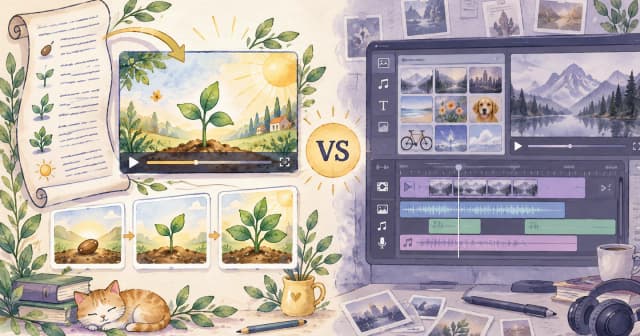
- Compare your next workflow, not an old feature checklist. Moovly historically offered a broad media editor and automation tools. Skiddee focuses on generating illustrations, narration, and progressive visual reveals from your words.
- Rebuilding is possible; automatic migration is not offered. Bring a saved script to Skiddee. It cannot recover your Moovly account or import its editable projects.
You sat down to make a video. Instead, you found yourself investigating the whereabouts of your video maker. That was probably not on the storyboard.
If you searched for “what happened to Moovly,” “Moovly login not working,” or “Skiddee vs Moovly,” this guide is for you. First, we'll separate the evidence from the speculation. Then we'll help you decide whether Skiddee fits the video you still need to make.
How we compared them: This article is written by the Skiddee team. It compares current Skiddee product behavior with Moovly's historical company announcements and documented workflow. Website checks and research were completed September 10, 2026. We could not verify a working Moovly editor, so this is a researched comparison, not a live head-to-head test. Recommendations are our assessment of fit.
What happened to Moovly?
The clearest current finding is that Moovly's main domain redirects to a domain marketplace instead of its video creation platform. Both the bare and www homepage led to DropCatch's moovly.com page when checked on September 10, 2026.
The marketplace page identifies moovly.com as a domain it caught, gives June 29, 2026 as its expiry-and-drop date, and says the domain auction ended. This is direct evidence about the domain's status, not the date the video service stopped working.
The public record also includes earlier account-access complaints and corporate filing problems. These are separate pieces of evidence; they do not establish a single, confirmed explanation for the service's disappearance.
A timeline of the available evidence
| Date | What the source says | What it tells a video creator |
|---|
| February 3, 2025 | Moovly announced that two directors had resigned, citing other commitments. Company announcement archive | A leadership change, not a shutdown announcement. |
| February 6, 2025 | Moovly announced a failure-to-file cease trade order related to overdue annual financial filings. It said it was not subject to insolvency proceedings at that time. Company release via Nasdaq | A restriction on securities trading, not an order to close the video service. |
| July–August 2025 | Two reviewers described account-access problems and unanswered support requests. Trustpilot reviews | Dated user reports of disruption; not proof that every account failed on the same day. |
| September 7, 2026 | Domain.News reports that moovly.com sold for US$12,166 through DropCatch. Domain sale report | Reporting about the domain name, not evidence of a transfer of customer accounts or software. |
| September 10, 2026 | Our homepage checks reached DropCatch. Current destination | The main website did not provide access to the original video maker during our check. |
Did Moovly shut down permanently?
We could not verify an official permanent-shutdown announcement or an exact shutdown date. The current domain behavior and dated access complaints are enough to justify looking for an alternative for a new project. They are not enough to claim that every customer file was deleted or that the company entered bankruptcy.
Wondershare's Moovly review also describes the platform as inaccessible since mid-2025. Because Wondershare sells a competing editor, we treat that as secondary commentary and use the dated customer reports and company releases to establish the timeline.
Was Moovly acquired?
There is reporting of a domain sale, but we found no verified announcement identifying a buyer of the operating video platform or a supported successor service. Domain.News names DropCatch as the sale venue; DNScroll lists the same date and amount but labels the venue GoDaddy. That discrepancy is a reason to describe the transaction as reported rather than independently confirmed.
A web address changing hands does not establish that its new owner acquired the editor, subscriptions, or customer projects. Skiddee is an independent alternative and has no affiliation with Moovly.
Moovly login not working: what can you do?
If a deadline is approaching, separate two tasks: recovering your existing work and creating the next video. A replacement tool can help with the second task even when the first remains unresolved.
- Gather what you already have. Look for downloaded videos, narration scripts, storyboards, original images, and audio in your own folders or team storage.
- Treat old links cautiously. An indexed help page or familiar logo does not establish that the original login service is operating. Verify who operates a page before entering account details or paying.
- Keep your purchase records. Save invoices and support correspondence. Skiddee cannot manage a Moovly subscription or resolve its account-access issues.
- Plan around the material you can access. A script can become a new illustrated video. An exported MP4 can serve as a reference, but it is not the same as an editable project.
We cannot confirm a working recovery route for Moovly accounts. Avoid treating a new video tool as a promise that your original projects can be restored.
Skiddee vs Moovly: how do the tools compare?
Moovly historically combined a visual editing workspace with media assets and automation. Its 2023 AI announcement described AI-assisted creation, uploaded media, stock assets, and API-based personalization. Its 2024 Acquia announcement documented a drag-and-drop editor and workflows using existing brand assets.
Skiddee starts with the explanation you want narrated. It plans scenes, generates illustrations, adds AI voiceover, and assembles a downloadable MP4. Visual elements appear progressively alongside the narration, helping you build an idea a little at a time.
| What matters | Skiddee today | Moovly historically |
|---|
| Starting material | A written script or transcript | Uploaded media, stock assets, and AI-assisted creation |
| Creative approach | Generate illustrated scenes around the narration | Compose and edit mixed-media videos |
| Visuals | Generated illustrations with progressive reveals | Graphics, animations, video clips, and other assets |
| Revisions | Revise content or settings, request scene changes, regenerate | Arrange media in a drag-and-drop editor and timeline |
| Automation | Transcript-to-video generation | API and Automator tools, including personalized content |
| Enterprise asset workflows | Evaluate separately; no equivalent DAM integration is claimed here | Documented Acquia DAM and PIM integration |
| Availability | Current script-to-video product | Original editor access could not be verified |
| Moving old projects | Rebuild from your available script; no Moovly project import | Account and project access remain unresolved |
Historical workflow sources: Moovly's company announcements above and its company-written profile on Trustpilot. Skiddee workflow: product overview and current product documentation. The Moovly column describes former capabilities, not a current offer.
When is Skiddee a good Moovly alternative?
Skiddee is a strong fit when the heart of your video is an explanation. A lesson about pollination, an onboarding story, or a faceless video answering a common question can all begin with the words the audience needs to hear.
Your creative decisions stay close to that message: choose a voice, choose an illustration style, and review how each scene communicates the idea. You can revise the transcript and settings or use the project AI assistant to request scene changes, then regenerate the affected output.
That is particularly useful for educators, solo creators, and small teams who want an illustrated format without arranging every visual element manually. Our guide to making educational videos explains how to start with one learning objective.
The trade-off is control. Skiddee is not a general-purpose timeline editor, a Moovly project converter, or a replacement for every enterprise integration. If the brief requires exact object placement, footage editing, or an existing asset-management workflow, evaluate an editor built for those requirements. Our comparisons with Canva and Vyond explore other production approaches.
Generated illustrations also need review. Check labels, factual relationships, narration, and pacing. A picture can be charming and still put the wrong thing in the wrong place.
Rebuild your next explainer in Skiddee
Before rebuilding, watch this existing Skiddee sample to judge the illustrated format and narration for yourself. It is a product example, separate from the hypothetical bee lesson below.
Open the Skiddee video sample to view it separately.
Imagine your next video answers: “How do bees help flowers?” You have a saved script, but the old editing workspace is unavailable. You can reuse the explanation without recreating its layout.
1. Recover the message
Start with your own saved narration or rewrite it from your notes. Keep one clear idea per beat. For example:
A bee visits a flower to collect food. Pollen can stick to its body. When the bee visits another flower of the same species, some pollen can reach that flower's stigma, helping pollination happen.
The bee has a busy schedule. Your script can afford to be brief.
2. Choose the viewing experience
Paste the script into a new Skiddee project. Choose a voice and illustration style that suit the audience, then select an aspect ratio: vertical for a phone-first video, square for a square format, or landscape for a wider presentation.
Need help turning notes into narration? Follow how to turn a script into a video.
3. Generate, then review the explanation
Check whether the illustrations show the right relationship between the bee, flower, and pollen. Does each reveal arrive with the words that explain it? Is anything decorative stealing attention from the lesson?
Ask for a scene revision if needed, then review the regenerated result. This is a hypothetical creative example, not a benchmark or a guaranteed generated sequence.
4. Download and keep a local copy
Download the finished MP4 and save the script alongside it. Keep your own source material and finished exports as part of your publishing routine.

Concept illustrations, not product screenshots or examples of automatic Moovly project migration.
Pricing: can you try Skiddee for free?
Eligible new Skiddee accounts receive 1,500 free credits. Generation and revisions consume credits, so that allowance does not guarantee a fixed number of finished videos. Free-user videos include a Skiddee watermark.
The current credit-purchase option is US$15 for 4,500 credits. Purchases include the watermark-free benefit. Check the offer and checkout total in your account before buying; pricing can change.
We have not reproduced an old Moovly subscription price as if you could buy it today. Without a verified operating editor and checkout, that would make the comparison less useful. Budget around the next finished video: initial generation, likely revisions, and the output you need.
Give your next explanation a fresh start
If you came to Moovly for a way to make ideas visual, that goal still makes sense. Start with one saved script and see whether Skiddee's illustrated approach fits your audience before rebuilding a whole series.
Your next video does not need a new subject. It might just need a new place to begin.
FAQ
Is Moovly still available in 2026?
As of September 10, 2026, the main domain redirected to DropCatch and we could not verify access to the original editor. We have not found a verified service-restoration announcement. See the dated evidence above rather than relying on older product listings.
Why is Moovly not working?
The exact cause of the service disruption is not confirmed in the sources we found. User access complaints, a corporate cease trade announcement, and a reported domain sale are documented separately. They do not prove a single cause.
Who bought Moovly?
We could not verify a buyer of the video platform. Reports about a sale of moovly.com concern the domain name; they do not establish ownership of the software or customer accounts.
Can I import my Moovly projects into Skiddee?
No direct Moovly project import is offered. You can paste a saved narration script into Skiddee and generate a new illustrated video. Skiddee cannot recover files from an inaccessible Moovly account.
Is Skiddee a free Moovly alternative?
You can try it with the 1,500-credit allowance for eligible new accounts. Ongoing generation requires sufficient credits, and free-user videos are watermarked. See the pricing section for the current purchase option.
Is Skiddee suitable for whiteboard-style explainers?
Consider it if what you want is an illustrated explanation that unfolds alongside narration. Skiddee uses progressive illustration reveals; do not assume that means a literal drawing-hand animation or Moovly's exact visual effects. Review the Skiddee examples to judge the fit.
Sources
- Moovly Media Inc. Company announcement archive — February 3, 2025 director resignation announcement.
- Moovly Media Inc., via Newsfile/Nasdaq. Moovly Announces Failure to File Cease Trade Order, February 6, 2025 — filing and securities-trading context; statement about insolvency proceedings at that date.
- Trustpilot contributors and company profile. Moovly reviews — July 6 and August 1, 2025 access reports; historical company-written workflow description. Individual reports are not platform-wide incident records.
- Xuboss, Domain.News. Moovly.com Sold for $12,166 via DropCatch, September 8, 2026 — reports a September 7 domain sale.
- DNScroll. September 7, 2026 sales listing — matching reported amount and date, conflicting venue label.
- DropCatch. moovly.com domain page — observed homepage redirect destination on September 10, 2026.
- Wondershare Filmora. Moovly Review (2026) — secondary competitor commentary on service availability.
- Moovly Media Inc. Moovly's AI-powered Platform Makes Video Creation Effortless, December 7, 2023 — historical AI, media, and automation offering.
- Moovly Media Inc. Acquia OEM partnership announcement, August 20, 2024 — historical editor and enterprise asset integration.
- Skiddee. Product overview — workflow and free-credit offer, supplemented by current product documentation for revisions, credit purchases, and watermark behavior.
Sources checked September 10, 2026. Availability and offers may change.
About the author
Lorena Casillas — Growth at Skiddee. She is part of the team behind Skiddee, an AI tool that turns scripts into illustrated animated videos.