Key takeaways
- Skiddee is built for one focused job: turn a finished script into a narrated, illustrated video. Pick a voice and visual style, then let the video assemble around your words.
- Vyond is a broader business-video platform. Its Vyond Go tools can start from a prompt, script, document, or URL, and its Studio gives teams avatars, templates, scenes, timeline editing, and localization tools.
- Choose Skiddee when the message is already written and you want a distinctive illustrated explainer without learning an editor. Choose Vyond when a presenter, hands-on editing, brand controls, or multilingual team workflows are part of the assignment.
TL;DR: Vyond is a flexible production workspace with AI generation inside it. Skiddee is the shorter path from a script to an illustrated video. Neither is universally better; the right choice depends on whether you need to build and edit a business video or publish a clear, visual explanation from words you have already written.
What's the difference between Skiddee and Vyond?
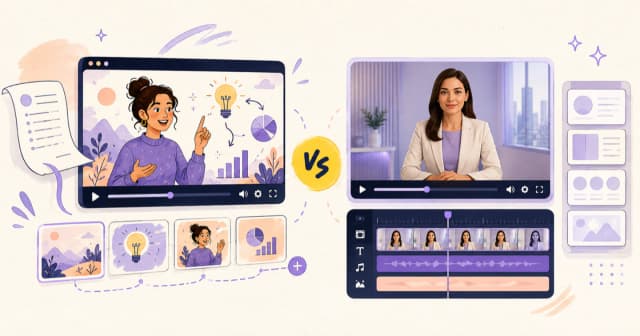
Vyond began as an animated business-video maker and has grown into an all-in-one AI platform. Vyond Go can generate a video from a prompt, script, document, or URL. From there, its QuickEdit and Studio workflows let you change narration, characters, scenes, and visual assets. It also has AI avatars, text-to-speech, text-to-image, templates, screen recording, collaboration features, and translation options on higher plans.
That breadth is useful when a training team needs an avatar presenter, a marketing team needs a reusable branded template, or someone needs to keep adjusting individual scenes after generation. It also means there are more choices to make before the video is finished.
Skiddee takes a more opinionated path. You bring the script you want spoken, choose an AI voice and illustration style, and Skiddee turns the script into a finished animated video with a fresh illustration for each scene. There is no avatar to cast and no timeline to arrange. It is deliberately narrower: the trade-off for less production control is a much simpler, script-first workflow.
| Skiddee | Vyond |
|---|
| What it is | Script-to-illustrated-video generator | AI video platform and editable video studio |
| Starting point | A finished script | Prompt, script, document, or URL |
| What viewers see | Custom illustrations matched to the script | AI avatars, animated characters, mixed media, templates, or custom scenes |
| AI capabilities | Script-aware scene illustrations and AI voiceover | Vyond Go, AI avatars, text-to-speech, text-to-image, document and URL-to-video |
| Editing model | Direct the output through your script, voice, and style | Edit narration, scenes, characters, assets, and timeline in Studio |
| Best for | Explainers, faceless content, and educational storytelling | Presenter-led training, internal communications, and editable business videos |
The same script, two different workflows
Imagine you have written a 60-second customer-onboarding script. It explains a feature, answers a common question, and ends with one clear next step.
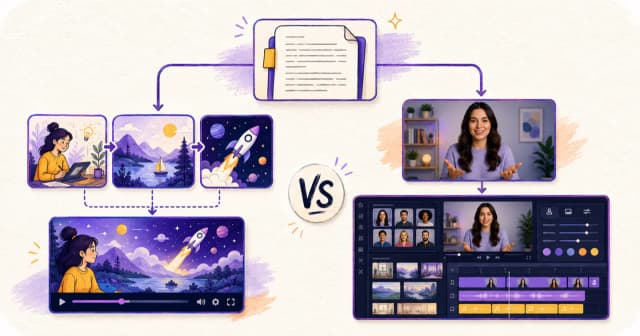
In Skiddee, that script is the brief. Choose a voice and illustration style, then generate. The voice reads the script and the video gets a new illustration for each beat: the customer problem, the product moment, and the action to take next. Because the visuals are made for the script, it works especially well when the words need to explain an abstract idea, process, or story.
In Vyond, the same script can go through Vyond Go as a script-to-video project. Vyond asks you to choose a layout, character, and voice. Its script-to-video flow supports narration or talking-head layouts for a single speaker, and conversation layouts for up to two characters. After generation, you can bring the result into Studio to change scenes, swap an avatar, alter the timing, add a screen recording, or apply a template and brand assets.
That is a real advantage when the video needs a visible presenter or an editor's touch. But for a creator who already has the script and does not want to make production decisions scene by scene, it can be more tool than they need.
How do the AI capabilities compare?
Both products use AI to reduce the work between an idea and a video. They apply it to different jobs.
Skiddee's AI is focused on visual storytelling. It starts from the exact words you want spoken. The system builds the narration and scene illustrations around those words, so an explainer can move from concept to concept without you sourcing stock footage, writing visual prompts for every frame, or putting a digital person on camera. The result is consistently illustrated, rather than a mix of avatar shots, templates, and media.
Vyond's AI is a wider toolkit. Its Vyond Go flow can draft from a prompt or turn supplied source material into a video. Vyond also offers AI avatars, text-to-avatar, text-to-image, text-to-speech, and short text-to-video clips. That makes it better equipped for organizations that need different output formats from the same platform, including avatar-led presentations and localizable business communications.
The practical distinction is not "AI versus no AI." It is whether the AI should make a finished illustrated video from your script, or give you a set of AI-assisted production tools to shape yourself.
Which tool is easier to use?
For a script-first explainer, Skiddee is easier because its workflow has fewer decisions. You do not need to choose a presenter, lay out scenes, find assets, or learn a timeline. You write the words, choose the voice and style, and generate. That is particularly helpful for educators, coaches, consultants, and creators who know their subject but do not consider themselves video producers.
Vyond is approachable for a full-featured video platform, but its flexibility adds surface area. A user may need to choose from a generation method, layout, character, voice, template, and Studio controls before the result feels finished. That work is worthwhile when you need it. It is unnecessary when the goal is simply to turn a completed script into a polished illustrated video.
| If you need to... | Pick |
|---|
| Turn a written explainer into a visual video with no timeline work | Skiddee |
| Put an AI presenter on screen | Vyond |
| Create a recognizable illustrated look for a faceless channel | Skiddee |
| Change individual scenes, characters, or timing after generation | Vyond |
| Make internal training content in multiple languages | Vyond |
| Publish educational, concept-led, or story-led videos from scripts | Skiddee |
How does pricing compare?
The products are aimed at different buying patterns. Eligible new Skiddee accounts receive 1,500 free credits, then can use prepaid credits for occasional projects or monthly plans for regular publishing. That makes it practical for someone who wants to make an explainer now without taking on a full production-suite subscription.
Vyond's public plans start at $99 per month when billed monthly, or $58 per month on an annual Starter subscription. Those plans include Vyond's wider platform and a monthly credit allocation for AI features. Professional, Enterprise, and Agency plans add more collaboration, localization, brand-management, and credit capacity. It is a more substantial investment, but it buys a broader production environment for teams that will use those capabilities.
Compare the output and the workflow before comparing the sticker price. Skiddee is priced around making the finished illustrated video. Vyond is priced around access to an editable, multi-purpose video platform.
Who should choose Vyond?
Vyond is the stronger choice in a few clear cases:
- You need an on-screen presenter. Its AI avatars are designed for talking-head, presenter-led video formats.
- You need production control. You can edit scene timing, characters, narration, assets, and templates after generation.
- You make internal business video at scale. Collaboration, brand management, localization, and enterprise controls are central to Vyond's offering.
- You want one platform for different video formats. Vyond can handle animated scenes, mixed-media projects, screen recordings, avatars, and more in one workspace.
Who should choose Skiddee?
Skiddee is a better fit when the script is the product and the video should make it easier to understand:
- Educators and explainers. A new illustration for each idea can make a lesson or process easier to follow than one presenter speaking to camera.
- Faceless creators. Skiddee makes illustrated videos without asking you to be on camera or use an avatar.
- Creators who value a consistent visual identity. Every scene shares the illustration style you chose, rather than mixing templates and asset types.
- People who do not want to learn video editing. There is no timeline, scene canvas, or asset library to manage before you can publish.
- Occasional publishers. Prepaid credits are useful when video is a project, not a monthly production operation.
The important limitation is equally clear: Skiddee is not a replacement for an editor or avatar platform. If your video requires a human-like presenter, detailed scene revisions, a custom brand template, or multilingual enterprise workflows, Vyond is the better tool.
Try Skiddee free
Eligible new accounts receive 1,500 free credits. Bring a script, choose a voice and a visual style, and Skiddee turns it into a narrated illustrated video without a timeline or avatar setup.
FAQ
Can Vyond turn a script into a video?
Yes. Vyond Go supports script-to-video, alongside prompt, document, and URL inputs. Its script workflow lets you choose a layout, character, and voice, then continue editing the result in Vyond Studio.
Does Skiddee use AI avatars?
No. Skiddee creates illustrated scenes and AI narration from a script. That is intentional: it is designed for faceless explainers and visual storytelling, not talking-head video.
Which is better for training videos?
It depends on the format. Vyond is better when training needs a branded presenter, editable scenes, localization, or enterprise collaboration. Skiddee is better when the material is a written lesson or process that benefits from a clear illustrated walkthrough.
Which tool is better for beginners?
For someone starting from a written script, Skiddee has the simpler workflow because it removes the timeline, asset, character, and layout choices. Vyond is still approachable, but it exposes more of the production process because it is built to give you more control.
Sources
About the author
Lorena Casillas is Co-founder of Skiddee, an AI tool that turns scripts into illustrated animated videos. She writes about faceless video, creator economics, and AI tooling for educators.