Key takeaways
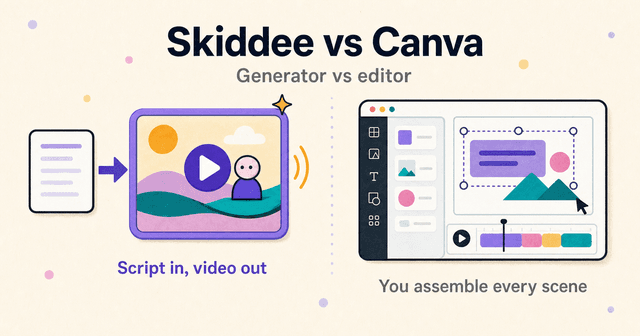
- Canva is a design editor where video is one canvas among many. You assemble each video by hand: pick a template, swap in clips, type text, adjust the timeline.
- Skiddee is a generator. You paste a script, pick a voice and illustration style, and it produces the finished narrated video. No timeline, no canvas.
- Neither replaces the other. Canva gives you control of every frame. Skiddee gives you a done video from words. Pick based on whether you start from footage or from a script.
TL;DR: Canva is an editor you operate. Skiddee is a generator you hand a script to. If your video starts as written words that need narration and visuals, Skiddee does the whole job in one click. If your video starts as photos, clips, and a brand kit you want to arrange yourself, Canva is the better tool.
What's the difference between Skiddee and Canva?
Canva is the mass-market design platform, and video is one feature inside it. A typical Canva video is animated text plus stock footage or your own photos, arranged on a designed template with music. Its AI features help around the edges: Magic Design for Video auto-assembles clips you upload into a roughly 60-second templated video, and Magic Media generates short text-to-video clips (powered by Google Veo 3, 4 to 8 seconds each, capped around 5 generations a month even on paid plans). There's no native AI avatar and, more importantly for this comparison, no paste-script-get-narrated-video path. You record or upload your own voiceover, then build the scenes by hand.
Skiddee does one thing. Paste the words the narrator should speak, pick a voice and an illustration style, and it generates custom illustrations for every scene (never stock, never an avatar), ElevenLabs narration that reads your script word-for-word, and assembles the finished video in one click. It is not a design tool. You can't drag elements around a canvas, and if you want hands-on control of every frame, Canva gives you that and Skiddee doesn't.
| Canva | Skiddee | |
|---|---|---|
| What it is | Design platform with a video editor | Script-to-video generator |
| Input | Templates, your clips/photos, stock media | A script |
| Narration | Record or upload your own voiceover | AI narration generated from your script |
| Visuals | Stock library, templates, short AI clips | Custom illustrations drawn per scene |
| Hands-on time | High: you assemble every scene | Low: one click after pasting the script |
| Pricing | Free; Pro $15/mo or $120/yr | 1,000 free credits, $15 top-ups, or monthly plans from $29 |
The same product ad, side by side
The cleanest way to show the difference is one real example. This is a video from our own account called "Product ad explainer": a roughly 30-second product ad script for a fictional meeting-notes app called RecallFlow, made with a custom illustration style and the Motivational (Male) voice on ElevenLabs v3 at 1.1x speed.
A few lines from the script, verbatim:
"POV: You leave a meeting... and instantly on to the next. No time to recap. Action items? Gone. Decisions? Gone."
"You talk. It remembers everything."
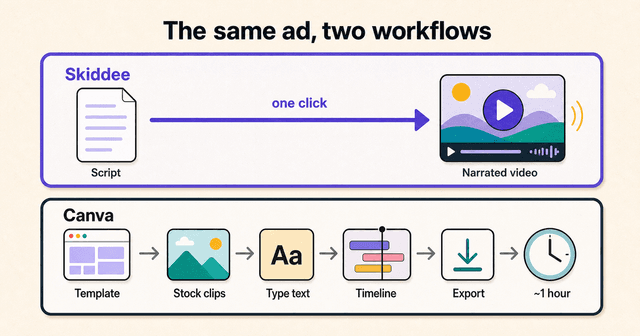
Here's what Skiddee produced from pasting that script. Each beat got its own custom illustration: the back-to-back meetings, the vanishing action items, the app catching everything. The narration reads the script word-for-word in the chosen voice. The finished ad assembled itself. No timeline work, no scene-by-scene placement, nothing dragged anywhere.
Now the honest part. We did not build this ad in Canva, so what follows is what Canva's documented workflow requires for a script like this, not a claim about an ad we made there. You'd pick a promo template, then swap in stock clips or your own screenshots scene by scene. The script lines become on-screen text you type into each scene, or you record your own voiceover, because there's no paste-script-get-narration path. Then you tweak timings on the timeline so the text and clips land together, and export. You get full control of every frame, and you spend the better part of an hour using it. Canva's Veo-powered clip generator makes genuinely nice 8-second cinematic shots, but it's capped monthly and it doesn't know your script. It generates from a prompt, one clip at a time.
| Skiddee output | Canva workflow | |
|---|---|---|
| Visuals | Custom illustration per script beat | Template + stock clips or your screenshots |
| Narration | AI voice reads the script word-for-word | Record/upload your own, or use on-screen text |
| Hands-on time | Minutes, mostly waiting | The better part of an hour |
| Control | Low: you direct via the script | Full: every frame is editable |
| Cost | About $1.30 per minute of finished video | Free to $15/mo, plus your time |
How do pricing models compare?
Canva is cheap and famously so. The free plan costs nothing, with no watermark as long as you stick to free elements (Pro stock is watermarked unless you license it), and a limited pool of AI credits. Pro is $15 a month or $120 a year and includes roughly 500 monthly AI credits shared across all of Magic Studio, which is where the 8-second clip generator's monthly cap bites. Teams runs about $20 and up per user per month.
Skiddee starts free too: your first 1,000 credits cover about 2-3 minutes of video, no card required, and credits never expire. After that, a one-time $15 prepaid pack buys 4,500 credits, roughly 11 minutes of finished video (about $1.30 a minute), or monthly plans start at $29 if you publish regularly. Your first purchase unlocks watermark-free videos, longer scripts, and 2K resolution.
On sticker price, Canva wins. But the two numbers buy different things. Canva's $15 buys you a workspace and your own labor does the rest. Skiddee's $1.30 per minute buys the finished video, narration included. If you'd otherwise pay for voiceover separately, the gap narrows fast.
Who should pick Canva?
Plenty of people, honestly. Canva is good, ubiquitous, and cheap. Pick it if:
- You want design control. Every element on every frame is yours to move, recolor, and animate. Skiddee can't do that.
- You live in brand kits. If your team already keeps fonts, colors, and logos in Canva, video that matches the rest of your output is one canvas away.
- Your video is built from things you already have. Photos from an event, product screenshots, footage from your phone. Canva's editor and Magic Design were made for exactly this.
- You're making design-led social promos. Animated text on a branded template is Canva's home turf, and it's fast at it once you know the editor.
One caveat from the public record: Canva's Video Editor 2.0 rollout in October 2025 drew widespread bug complaints on Reddit and Trustpilot. Worth a test run before you commit a deadline to it.
Who should pick Skiddee?
Pick Skiddee if your videos start as a script:
- Script-first creators. You write the words, the tool does the rest. The narration sticks to your script exactly, no summarizing or paraphrasing.
- Explainers and ads that need narration. There's no record-your-own-voiceover step. The voice is generated from the script in the same click as everything else.
- People with no time for timelines. No canvas, no layers, no drag handles. If timeline editing is the part of video you dread, there isn't one. Our guide to the best AI video tools for animated videos compares the script-first options if you want the wider field.
- Anyone tired of the template look. Every illustration is generated for your script, so two Skiddee videos never share a stock clip.
And to be plain about the trade: you give up frame-level control. You direct the video through the script and the style you pick, not by editing the output.
Can you use both?
Yes, and plenty of people do. A common split: thumbnails, social graphics, and channel art in Canva, the video itself in Skiddee. The two don't really compete for that workflow, since one is making designed stills and the other is making narrated motion. If you're already paying for Canva Pro, keeping it for graphics while generating videos elsewhere costs you nothing extra on the Canva side. If you're building a faceless YouTube channel, that's exactly the split we recommend for thumbnails.
Try Skiddee free
Your first 1,000 credits, about 2-3 minutes of video, are on us. Paste a script, pick a voice and a visual style, and Skiddee draws custom illustrations for every scene, adds AI narration, and assembles the finished video. No card needed.
FAQ
Can Canva turn a script into a narrated video?
Not directly. Canva has no paste-script-get-narration pipeline, so you either record or upload your own voiceover and assemble the scenes by hand, or type the script as on-screen text. Skiddee was built for that exact path: paste a script, pick a voice, and it generates the narration and visuals for you.
Is Canva's AI video generator free?
Partly. Canva's free plan includes a small pool of AI credits, and the Magic Media clip generator (powered by Google Veo 3) produces 4 to 8 second clips capped at around 5 generations a month even on Pro at $15/month. AI-generated clips are a garnish in a Canva video, not the whole video.
Which is faster for a 60-second explainer?
Skiddee, if you start from a script. It generates the illustrations, narration, and assembled video in one click. Top-up credits work out to about $1.30 per minute of finished video, with lower per-minute rates on monthly plans. In Canva you build the same video by hand (template, clips, text, timeline, export), which typically takes the better part of an hour.
Does Skiddee have templates like Canva?
No. Skiddee generates custom illustrations for each scene from your script instead of starting from a template, so no two videos share the same layout or stock footage. If you want to start from a designed template and edit every element yourself, Canva is the better fit.
Sources
- Canva — AI video generator, Veo 3 in Canva announcement, and pricing. Official feature and plan documentation.
- Canva Help — Magic Video and Magic Media. Workflow and generation-cap details.
About the author
Suyin Kee is Co-founder of Skiddee, an AI tool that turns scripts into illustrated animated videos. She writes about faceless video, creator economics, and AI tooling for educators.