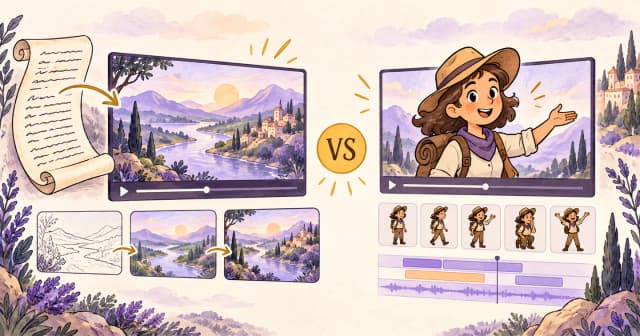
Key takeaways
- Choose Skiddee for narrated, illustrated explanations. Bring a script, select a voice and visual style, and generate scenes that reveal the idea as the narration unfolds.
- Consider Animaker for character animation and direct editing. Its cartoon toolkit suits projects where poses, expressions, and on-screen actions carry the story.
- Both use AI. Compare the kind of video you want and the revisions you expect, rather than choosing on the promise of automatic generation alone.
Your script is ready. Your camera is staying off. Now comes the surprisingly important question: should your idea become an illustrated story, or should a cartoon character step in and explain it?
That is a useful starting point for Skiddee vs Animaker. Both can help you make animated content without traditional animation training. Their strengths become clearer when you picture the finished video, then work backward.
How we compared them: This is a feature and workflow analysis by the Skiddee team, based on current Skiddee product behavior and Animaker's official documentation, reviewed September 9, 2026. We have not run a timed head-to-head production test. Recommendations are our assessment of fit; the example and images are illustrative, not measured results or product screenshots.
Skiddee vs Animaker at a glance
| What matters | Skiddee | Animaker |
|---|
| Core workflow | Transcript to narrated illustration video | AI generation plus an animation editor |
| Visual emphasis | Custom scene artwork with progressive reveals | Cartoon characters, actions, props, and other video styles |
| Starting point | The explanation you want narrated | A prompt, template, or animation project |
| Revisions | Edit content and settings, request scene changes, regenerate | Refine generated scenes with direct editing tools |
| Strong fit | Illustrated explainers, lessons, faceless storytelling | Character-led stories and carefully staged scenes |
| Main trade-off | Less direct control over individual objects | More editing decisions when you want detailed control |
Animaker's product overview describes its broader formats. Its AI video walkthrough explains generation and subsequent editing.
What does Skiddee do well?
Skiddee turns a transcript into a downloadable MP4 with AI narration and generated illustrations. Each scene has progressive reveal steps: visual elements appear as the explanation develops. You choose the voice, illustration style, and aspect ratio, then review the result.
Think of a storybook that explains itself out loud. A picture can introduce the setting, reveal a cause, then show a consequence. That is particularly useful when your subject is an idea or process rather than a presenter speaking to camera.
The focus also keeps the creative brief manageable. Start with what the viewer should understand. Choose an illustration style that suits the topic. Listen to the narration and check that each scene earns its place. Our guide to turning a script into a video walks through that starting point.
You can change the transcript and settings, ask the project AI assistant for scene revisions, and regenerate affected output. Those revisions can consume credits. Skiddee does not offer a general-purpose canvas for manually positioning every object or choreographing character movement. If a brief requires a mascot to wave, walk, and point on cue, that distinction matters.
What does Animaker do well?
Animaker's cartoon video maker centers on customizable characters and animation building blocks. That is appealing when a recurring host, expressive reaction, or staged interaction is part of the message. A character can do more than decorate the frame: it can demonstrate the behavior you are teaching.
Animaker also supports AI creation. Its current guide describes both a 2D animation route and a generative route. After generating, Advanced Edit provides access to characters, props, text, scenes, and a timeline. You can adjust a character's action or expression and control when elements appear. See the official generation and editing walkthrough.
Our assessment: this is a stronger fit when your brief contains specific stage directions. “Make the guide look surprised, then point at the map” calls for a different kind of control from “illustrate why the river bends.”
One explainer, two ways to tell it
Imagine a short educational video called “Why do rivers bend?” Your opening: “A river rarely takes the shortest route. It has a landscape to negotiate.”
The lesson introduces a bend, explains how erosion and sediment deposition can reshape the banks, and ends with a simple takeaway: a river's route changes over time. This is a planning example, not an output test.
With Skiddee: let the explanation lead
Write a short narration with three clear beats: the bend, the reshaping of the banks, and the changing channel. Choose a warm illustrated style and a calm voice, then generate.
Review whether each reveal adds useful information. Can a beginner follow the visual sequence? Are the banks and water movement represented correctly? If a scene is confusing, revise the explanation or request a scene change and review the new output.
This is where Skiddee's focus is helpful: the river itself can be the star. No presenter needs to audition.
With Animaker: give the lesson a character
A cartoon explorer could introduce the question beside a map. You could use the editor to stage the explorer's actions, place supporting elements, and adjust their timing. That approach follows the controls documented in Animaker's editing guide.
The character becomes part of the teaching style. Our recommendation is to keep the performance purposeful: one gesture that directs attention beats a parade of reactions. The river already has enough twists.
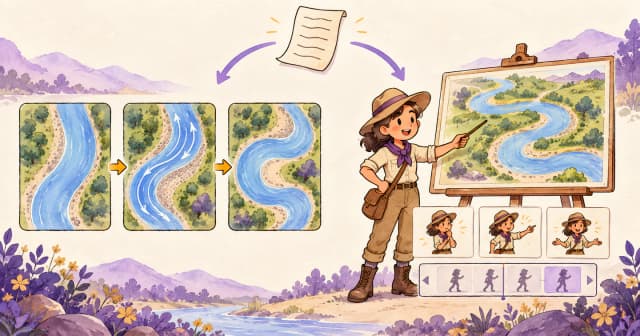
Concept illustrations of the two creative approaches, not actual tool outputs or a scientific diagram.
Which is easier for beginners?
Skiddee is a natural starting point if you think in scripts. Your main decisions concern the message, narration, style, and clarity of the generated scenes. You do not need to arrange a timeline to create the video.
Animaker is worth considering if you think in scenes and actions. Its character-oriented workflow may fit someone who already knows where the presenter should stand and what should happen next. Explore its cartoon creation tools if that sounds like your creative process.
Ease depends on the changes you actually need. Before choosing, complete this sentence: “The first thing I would want to fix is…”
- “The explanation is too complicated.” Begin with the script; Skiddee is a good fit for building an illustrated explanation around it.
- “The character should point at a different object.” Direct animation controls may matter more; evaluate Animaker.
- “The science in the picture is wrong.” Review and correct it in either workflow. Automatic generation does not replace subject knowledge.
For a stronger first draft, see our explainer video guide. A tool can assemble a video; a clear script gives it something worth assembling.
Pricing, free options, and what to check
Skiddee uses generation credits. You can start with its free offer and buy credits for further work. Free-user videos carry a watermark; paid eligibility unlocks removal. Generation and AI-backed revisions can use credits, so a balance does not translate into a guaranteed number of finished videos. Check the current offer on Skiddee and the purchase options in your account.
Animaker offers free and paid plans. Its pricing page separates video-generation allowances, generative asset credits, premium downloads, video length, and export quality. Paid plans remove the watermark. Prices depend on billing selection and region; confirm the checkout currency and total on Animaker's pricing page.
A useful budget comparison starts with the deliverable:
- Decide how many finished videos you need each month.
- Allow for revisions, including a scene that needs another attempt.
- Check the required video length, export quality, and watermark removal.
- Compare the total commitment, including annual billing if selected.
For client work, also check the applicable usage rights. Animaker's pricing page explicitly distinguishes commercial and reselling rights across its offering. Do not assume that a watermark-free export automatically includes every licensing permission. See its plan details.
We would not call either product universally cheaper without a defined workload. Ten simple videos and ten heavily revised videos are different purchases.
Which should you choose for your next project?
| Your brief | Our recommendation | Why |
|---|
| Explain an abstract idea with narrated artwork | Start with Skiddee | The illustrations develop around your explanation |
| Repurpose an article into a faceless video | Start with Skiddee | A focused script provides the starting material |
| Create a series of illustrated mini-lessons | Start with Skiddee | Progressive reveals can structure each concept |
| Build a story around a cartoon host | Consider Animaker | Character performance is central to the format |
| Control poses and the timing of visual elements | Consider Animaker | Direct editing is important to the brief |
For educators, choose the format around the learning objective. An illustrated process and a character demonstrating behavior solve different teaching problems. Our guide to making educational videos helps you plan what the viewer should learn.
For faceless creators, choose a format you can repeat without exhausting your ideas or your editing patience. If you already publish written content, try repurposing a blog post into a video: pick one question from the article, answer it clearly, and leave the rest for another episode.
Give your next explanation a visual life
Take one question your audience asks regularly. Write a short answer with an opening hook, one useful explanation, and a clear ending. Bring it to Skiddee, choose a voice and illustration style, and review how your words become a video.
Start small. “Why does this happen?” is enough for a first story. The epic documentary about everything can wait until after lunch.
FAQ
Is Skiddee an Animaker alternative?
Yes, for illustrated explainers, narrated lessons, and faceless storytelling. Skiddee is a focused alternative when you want scenes generated around your script. If you need direct character animation controls, evaluate Animaker's cartoon workflow.
Can Animaker generate videos with AI?
Yes. Animaker documents AI generation followed by optional Advanced Edit. See its current walkthrough. This comparison is about creative fit, not whether one tool uses AI and the other does not.
Does Skiddee animate talking cartoon characters?
Skiddee creates narrated illustrations with progressive reveals. Characters can appear in the artwork, but its workflow is not built around lip-synced cartoon performances or manual pose animation.
Can I edit a Skiddee video after generation?
Yes. Edit the transcript or settings, request scene revisions through the AI assistant, and regenerate affected output. Review the result after changes; AI-backed regeneration can consume credits.
Which is better for a faceless YouTube channel?
Our recommendation is Skiddee for a channel built around illustrated explanations and stories. Consider Animaker when a recurring cartoon host is central to the format. Test one representative episode and judge clarity, revision effort, and cost before planning a series.
Can I try them for free?
Both offer a free starting option. Check Skiddee's current offer and Animaker's plans for the latest allowances and restrictions. Free-user exports carry watermarks in both tools.
Sources
Product information reviewed September 9, 2026. Features and offers may change.