Key takeaways
- A good explainer video follows a four-beat script: problem, solution, how it works, call to action. Write it before you touch any visuals.
- Production routes range from $3,000–$10,000 at an agency to as little as ~$1.20 per minute on a monthly plan with an AI illustrated-video maker.
- You don't need design skills. If you can write a 150-word script, you can ship a finished video in an afternoon.
If you can write a tight four-beat script, you can make an explainer video that actually converts without an agency invoice or an editing timeline.
On this page:
- What makes a good explainer video?
- What goes into an explainer video script?
- How do you make an explainer video?
- How much does an explainer video cost?
- Where should you share your explainer video?
- How long should an explainer video be?
- Can I make one without design skills?
- Why not just use stock footage?
You know exactly what your product does. Getting anyone else to understand it in under two minutes is the hard part. That's the whole job of an explainer video. It's also why so many founders, educators, and marketers want one but stall the moment they price agencies or open editing software.
Here's how to make an explainer video the practical way. We cover what makes one work, the script structure proven across thousands of videos, what each production route costs, and a step-by-step path to a finished video using AI. No animation degree required.
What makes a good explainer video?
A good explainer video does three jobs in order. It names the pain the viewer already feels, shows your product solving it, then tells them what to do next. Most weak ones fail because they describe features instead of showing someone their own problem.
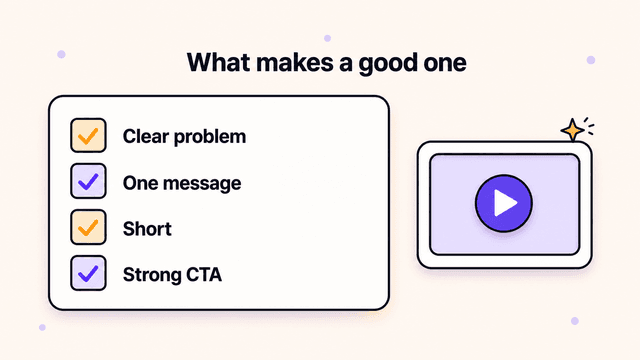
A few things separate the videos people watch to the end from the ones they close:
- It's short. 60 to 90 seconds is the sweet spot for a product explainer. Five minutes is fine for a how-it-works or onboarding video, but every extra second has to earn its place.
- The visuals match the words. When someone says "your team is drowning in spreadsheets," the viewer should see exactly that, not a generic stock clip of people pointing at a laptop.
- One idea per scene. A scene that tries to make two points makes neither.
- A clear call to action. End on the single next step you want, whether that's "start free" or "book a demo."
The visuals are where most explainer videos fall apart. Stock footage feels like stock footage. Talking-head avatars feel like a talking-head avatar. Custom illustrations made for your exact script keep the viewer's attention on your story. If you're weighing the two formats, here's a deeper look at talking head vs animated video.
What goes into an explainer video script?
Still deciding on the visual format? Compare Skiddee and Animaker for animated explainers to see how a script-led illustration workflow differs from directing cartoon characters.
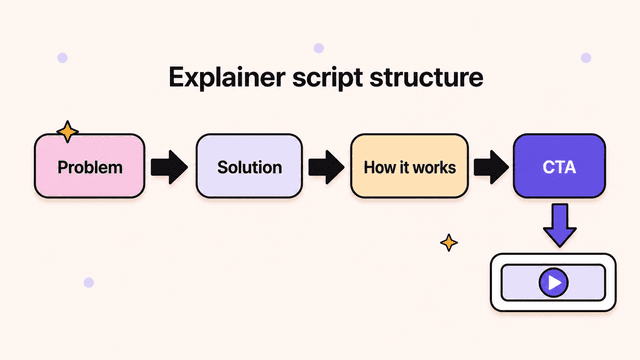
An explainer script follows a four-beat shape: problem, solution, how it works, and call to action. Write it before you think about visuals. The video is only ever as good as the script behind it.
- Problem. Open on the pain. Make the viewer nod within the first five seconds. "Editing a video takes hours, and you still hate how it turns out." If they don't recognize themselves here, they won't stay for the rest.
- Solution. Introduce your product as the answer to that exact pain. Keep it to one clean sentence. "Skiddee turns your script into a finished illustrated video in minutes."
- How it works. Walk through the three or four steps that make it real. This is where you build belief. Keep each step to one short line: paste your script, pick a voice and style, hit generate, download the finished video.
- Call to action. Tell them what to do now. One action, stated plainly. "Try it free, no card required."
A 60-second video is roughly 150 words. Read your draft out loud and time it. If you stumble, the viewer will too. Cut anything that sounds like a brochure.
Here's the shape applied to a product explainer:
Your idea deserves a video. But editing one takes hours, and the result rarely matches what was in your head. Skiddee fixes that. Paste your script, pick a voice and a visual style, and it generates custom illustrations for every scene, adds narration, and assembles the whole thing. No editing, no recording, no stock footage. Done on the first try. Start free today.
That's about 65 words. Tighten yours the same way. Once it reads cleanly, the next move is how to turn a script into a video without touching an editing timeline.
How do you make an explainer video?
If you're rebuilding after losing access to Moovly, start with the narration you already have. Our Skiddee vs Moovly comparison covers what is known about its availability and how to turn a saved script into a new illustrated explainer.
Write a tight four-beat script, then hand the visuals, narration, and assembly to an AI illustrated-video maker. Here's the full path from blank page to finished file, in an afternoon instead of a month.
- Write your script. Use the four-beat structure above: problem, solution, how it works, call to action. Use the live duration estimate below the script editor, then read the script aloud and cut until it is tight.
- Paste it in. Drop your script into Skiddee. There's no separate storyboarding step. It reads your script and breaks it into scenes for you, sticking to your words rather than rewriting them.
- Pick a voice and a visual style. Choose an AI narration voice that fits your brand and a visual style for the illustrations. This sets the look and tone for the whole video at once.
- Generate. In one click, it creates custom illustrations for every scene, adds the voice-over, applies transitions, and assembles the final video. This takes minutes, not days.
- Review and tweak. Watch it through. The goal is to get it right on the first try. If a scene needs a different illustration or a line needs re-narrating, regenerate that piece instead of starting over.
- Download and ship. Export the finished MP4 and put it to work.
You can try this on the free plan, which includes 1,500 credits, about 3–4 minutes of video, before you spend anything.
Try Skiddee free → Skiddee turns each script into a finished narrated video in minutes. Free to try, no credit card.
How much does an explainer video cost?
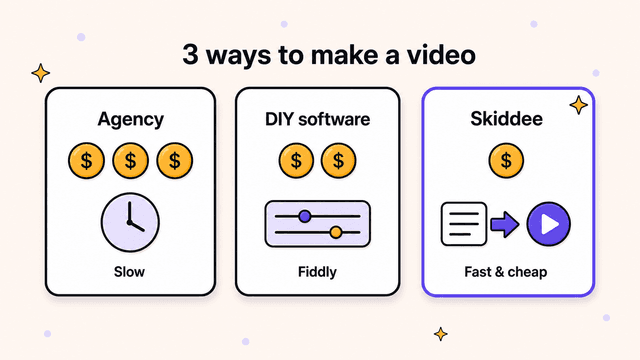
It ranges from a few dollars to ten thousand, depending on the route. An agency charges thousands and takes weeks. DIY software is "free" but eats days of your time. An AI maker like Skiddee runs a few dollars and finishes in minutes. Here's how the three compare:
| Route | Turnaround | Rough cost |
|---|---|---|
| Animation agency | 4–8 weeks | $3,000–$10,000 per video |
| DIY in animation software | Days per video | "Free" + days of your time |
| AI illustrated-video maker | Minutes | as little as ~$1.20/min on a plan |
Hire an animation agency. This gets you a polished, bespoke video. It also gets you a quote in the thousands and a timeline of four to eight weeks. You go through script rounds, storyboard rounds, and revision rounds, and every change after the contract costs extra. For a one-time hero video on your homepage, it can be worth it. For anything you need more than once, the math falls apart fast.
Do it yourself in animation software. Tools like After Effects or the template-based DIY editors look cheap on paper. The hidden cost is your time. Real motion design has a steep learning curve, and template tools push you back into stock footage and clip-art that looks like everyone else's video. Expect to spend days on your first one and still feel it looks amateur.
Generate it with an AI illustrated-video maker. This is the route that changed the math. You write the script, and the AI handles illustrations, narration, transitions, and assembly. The good ones generate custom illustrations for your specific script rather than pulling from a stock library, so it still looks like yours.
This is what Skiddee does. It runs as little as ~$1.20 per minute of video on a monthly plan. Compare that to thousands at an agency: you can make a dozen videos for less than the cost of a single agency revision round. The trade is that you're not getting a hand-animated, frame-by-frame masterpiece. For product explainers, onboarding, how-it-works, and educational content, that ceiling is rarely the thing holding your video back.
Where should you share your explainer video?
Everywhere your audience already is: your homepage, onboarding flows, social platforms, and sales follow-ups. A finished video sitting in a folder helps no one. Put it in front of people:
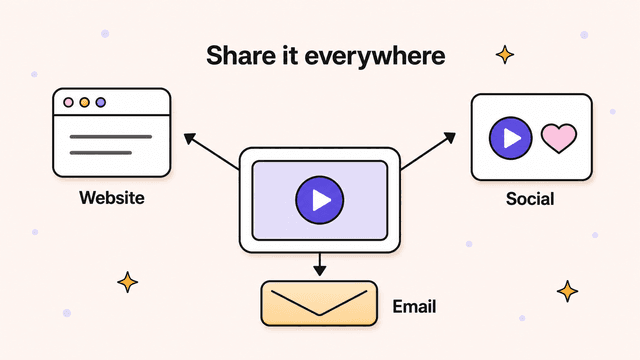
- Above the fold on your homepage or landing page. A short explainer near your headline lifts conversions by giving visitors the gist without making them read.
- In onboarding emails and your product's first-run experience. A how-it-works video cuts support questions and speeds up activation.
- On YouTube and short-form platforms. The illustrations are custom and the narration is built in, so these videos work as standalone content, not just embeds.
- In sales follow-ups. A 60-second explainer sent after a call keeps your pitch consistent when you're not in the room.
The AI route has one more advantage. Each video costs only a few dollars, so you can make a different one for each channel and audience instead of stretching a single expensive video everywhere.
Try Skiddee free
Skiddee turns your script into a finished illustrated video, custom illustrations, narration, transitions, and all, in minutes. Your first 1,500 credits, about 3–4 minutes of video, are on us. No credit card to start.
FAQ
How long should an explainer video be?
60 to 90 seconds for a product explainer; up to five minutes for onboarding or educational videos if every scene earns its place. Match the length to how much the viewer needs.
Can I make one without design skills?
Yes. If you can write a short script, you can make the video. The AI handles illustrations, narration, transitions, and assembly, so there's nothing to edit and nothing to record. See how to make animated videos without animation skills.
Why not just use stock footage?
Stock footage and talking-head avatars look generic because everyone draws from the same library. Custom illustrations generated for your exact script keep the visuals tied to your story, which is what holds attention.
Start with the script
The hard part of an explainer video was never the animation. It was the cost and the time that made you put it off. Write the four-beat script, pick the route that fits your budget, and ship it.
If you want to skip the agency invoice and the editing rabbit hole, try Skiddee free and turn your script into a finished illustrated video today.
About the author
Suyin Kee is Co-founder of Skiddee, an AI tool that turns scripts into illustrated animated videos. She writes about faceless video, creator economics, and AI tooling for educators.