Key takeaways
- When comparing Pictory alternatives for teaching, start with what learners need to see: real footage, a demonstration, or an illustrated explanation.
- Skiddee turns your script into original illustrated scenes with narration and progressive reveals. You supply the lesson; it handles video production.
- Start small: one learning outcome, a short spoken script, and a question students can answer after watching.
Your lesson notes already have the good stuff: the explanation that finally made fractions click, the example your class loved, and the question that got everyone thinking. Turning those notes into a video should not require a second career in animation.
If you are exploring Pictory alternatives because you want illustrated, script-accurate lessons, Skiddee is worth trying. It creates illustrated scenes from your words, giving you a practical way to make a recap, a lesson introduction, or an explanation students can replay.
Here is how to choose the right approach and turn one page of notes into your first animated lesson.
Pictory or an illustrated alternative: what does your lesson need?
Pictory's documented script-to-video workflow matches text with stock footage, images, and animations. It also offers AI-generated visuals, so describing it as stock-only would be misleading. See its script-to-video overview and text-to-video features.
For an educator, the useful distinction is the visual you need. Footage of a forest can set the scene for a habitats lesson. Explaining how four equal parts make a whole calls for a specific diagram.
Skiddee generates original illustrations for scenes and reveals their elements alongside narration. That makes it a candidate when your explanation needs purpose-made visuals. A photograph of children sharing lunch might introduce fairness; a drawing of four equal tiles can show exactly what “one quarter” means.
| Your teaching task | An approach to consider | What to check |
|---|
| Introduce a topic using real-world footage | A stock-media workflow such as Pictory | Does each clip support the explanation? |
| Explain a concept through original drawings | An illustrated workflow such as Skiddee | Are the diagrams and narration accurate? |
| Show students where to click in an app | A screen recording | Can learners read the interface and follow each action? |
| Demonstrate a physical technique | Your own recorded demonstration | Can learners see the important movements clearly? |
This is a guide from the Skiddee team, not an independent ranking or a head-to-head classroom test. For more on lesson structure and pacing, explore our guide to making educational videos.
What “script-accurate” should mean for a teacher
It means keeping the explanation you intended to teach: the vocabulary, sequence, and examples. Skiddee's scene planning is designed to preserve your spoken transcript as it divides the lesson into scenes and reveal steps.
That does not make every generated visual automatically correct. “Four equal parts” needs four genuinely equal parts on screen. A correct sentence beside an incorrect drawing is still an incorrect lesson.
Keep your approved script handy and review the finished video against it. Listen for subject terms and check counts, labels, arrows, and relationships. Your teaching judgment is the final quality check.
How to turn lesson notes into video with Skiddee
1. Choose one thing students should understand
Pick a small outcome: “Students can recognise one quarter of a whole.” Save equivalent fractions and adding fractions for another video. One clear idea gives every scene a purpose.
For your first attempt, choose something you already explain confidently. You are making a reusable version of a familiar explanation, not writing a whole new unit.
2. Turn shorthand into words you would say aloud
Notes remind you what to teach. A script explains it to someone else. Expand abbreviations, connect the steps, and read the result aloud before generating.
For example, these primary-school notes:
Whole → four equal parts. One part = one quarter. Equal matters. Check understanding.
Become this copy-ready narration:
Imagine a square made from four equal square tiles. Together, the tiles make one whole. Now colour one tile purple. One of the four equal parts is purple, so one quarter of the whole is purple. The word equal matters: each part must be the same size. If we split a whole into four unequal pieces, each piece is not necessarily one quarter. Look at our four equal tiles again. If we colour a second tile purple, how many quarters will be purple? Pause the video and explain your answer.
Keep your answer key outside the narration: two quarters. In class, follow the video with paper squares or counters so learners can try the idea themselves.
3. Create your project and choose the presentation
Create a project in Skiddee and paste the spoken script into the transcript editor. Choose a voice, illustration style, and aspect ratio. A landscape format is a sensible starting point for a classroom screen.
Use a simple style for concepts where counting and spatial relationships matter. Friendly characters can help tell a story; fractions need clearly distinguishable parts more than decorative detail.
Keep teacher reminders and answer keys out of the spoken script. For more on preparing narration, see how to turn a script into a video.
4. Generate and review the lesson
Skiddee plans the scenes, creates illustrations and narration, and assembles the video. The animation progressively reveals illustrated elements as the explanation unfolds.
For the fractions example, check that the whole stays consistent, the four tiles are equal, and exactly one tile is highlighted when the narrator says “one quarter.” Use the project's editing tools or chat assistant to request corrections, regenerate the affected work, and review again.
5. Download and give students something to do
Download the finished MP4 and share it through your usual school-approved learning platform. Pair it with a small task: draw an example, explain a step, or answer the final question.
A video can handle the repeatable explanation while you spend classroom time listening to how students use it.
Ideas for kindergarten, primary, and high school
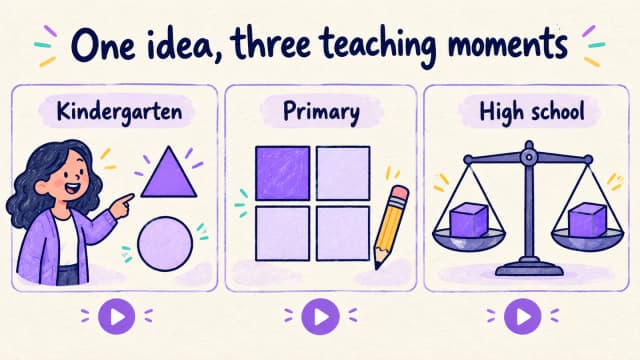
These illustrations suggest lesson concepts; they are not screenshots or sample videos generated inside Skiddee.
Kindergarten: spot a shape
Introduce a circle and a triangle with short, concrete sentences. Ask children to trace a circle in the air, then find something round nearby. Watch together and pause for their answers. The video becomes the start of a classroom activity.
Primary school: make an abstract idea visible
Use the fractions script above, illustrate the stages of a story, or explain how a seed becomes a plant. Keep one visual change tied to one spoken idea. Finish with a drawing or sorting activity so students can show what they understood.
High school: unpack a difficult step
Explain why an equation must stay balanced, trace a historical cause and consequence, or introduce a scientific model. Define unfamiliar terms and distinguish a simplified model from the real phenomenon. For equations and scientific diagrams, inspect every symbol and relationship before sharing.
The same workflow can support tutors, homeschool educators, adult educators, and staff trainers. Adjust the vocabulary and examples to your learners; illustrations do not have to feel childish.
Before you subscribe: test one real lesson
The most useful comparison is a lesson you actually need next week. Prepare one approved script and use it to evaluate your shortlist of Pictory alternatives.
- Meaning: Does the narration preserve the explanation and pronounce important words clearly?
- Visual accuracy: Do the images teach the concept, including its counts and relationships?
- Revision effort: How much work does it take to get a classroom-ready result?
- Delivery: Does the exported video work in your learning platform? Provide a readable transcript and check any captions your sharing platform adds.
- Budget: Check current generation allowances, revision costs, export options, and subscription terms against your likely lesson volume.
If you regularly need illustrated recaps, a Skiddee subscription may fit that routine. Start with one lesson, then use the current plan options in your account to decide how much generation capacity you need. There is no need to commit your entire term's planning before seeing whether the workflow suits you.
FAQ
Is Skiddee a Pictory alternative for educators?
Yes, particularly when your goal is an illustrated explanation built from a script. Choose based on the material you teach and the visuals it needs. Original illustrations and real-world footage serve different teaching purposes.
Can I use handwritten lesson notes?
Yes. First type or transcribe them, check the wording, and shape the content into narration. Paste the finished spoken script into Skiddee. This workflow does not depend on uploading a photograph of your notebook.
Do I need animation or video-editing skills?
You can create a narrated illustrated video by supplying a script and choosing settings. Skiddee handles the production steps. Allow time to review and correct the result, especially for diagrams, technical vocabulary, and tightly sequenced explanations.
Will the video follow my exact lesson?
Skiddee is designed to preserve the spoken transcript during scene planning. Review the resulting narration and images before teaching with them; script fidelity does not guarantee visual or subject accuracy.
How long should my first lesson video be?
Start with one concept that takes about a minute or two to explain aloud. This is a practical starting point, not a rule for every age group. Shorten, split, or expand it according to your learners and the activity around the video.
Give tomorrow's lesson a replay button
Pick the explanation you repeat most often. Turn those notes into a few friendly paragraphs, add a question, and create your first illustrated lesson in Skiddee. Tomorrow, you will have something students can watch again—and an example to build on for the next topic.
Sources