Key takeaways
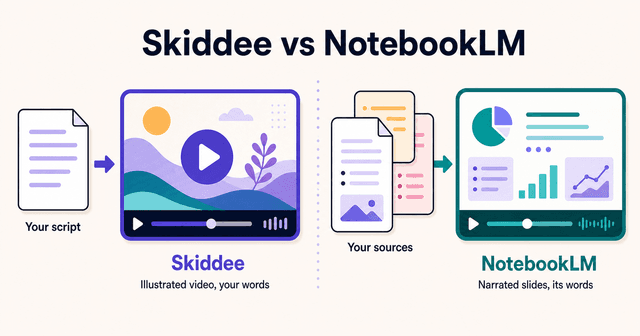
- NotebookLM turns sources you've collected into a study aid. Skiddee turns a script you wrote into a publishable video. They look similar from a distance and do completely different jobs up close.
- NotebookLM writes its own narration from your documents and you can't change a word of it. Skiddee reads your script word-for-word and builds the visuals around your writing.
- NotebookLM is bundled with Google AI plans on daily quotas (free tier: 3 videos a day). Skiddee starts with 1,000 free credits, then offers $15 top-ups or monthly plans from $29.
TL;DR: NotebookLM is a research tool that can output video; you give it documents and it explains them back to you in its own words. Skiddee is a video tool that starts from your words; you give it a script and it produces the illustrated video you'd publish.
What's the difference between Skiddee and NotebookLM?
NotebookLM is Google's AI research notebook. You upload sources (PDFs, docs, URLs, YouTube links) and it generates grounded outputs from them: Audio Overviews, where two AI hosts discuss your material podcast-style, and Video Overviews, where a single AI voice narrates AI-generated slides built from your documents. The customization is one prompt box where you can steer focus and audience. There is no script input. NotebookLM reads your sources and writes its own narration.
Skiddee starts at the other end. You bring the script, the exact words the narrator should speak. Pick a voice and an illustration style, and Skiddee generates a custom illustration for every scene (never stock, never an avatar), adds ElevenLabs narration, and assembles the video in one click. It does not research a topic for you. It assumes the writing is the part you care about.
| Skiddee | NotebookLM | |
|---|---|---|
| Input | A script you wrote | Sources you upload (PDFs, docs, URLs) |
| Who writes the narration | You, word-for-word | NotebookLM, from your sources |
| Output format | Illustrated animated video | Narrated slide deck (Video Overview) or AI podcast (Audio Overview) |
| Editability | Edit scenes, regenerate illustrations, change narration | None after generation |
| Pricing model | Free credits to start, then $15 top-ups or monthly plans | Daily quotas bundled with Google AI plans |
| Best for | Publishing your version of a story | Understanding material you've collected |
If your starting point is "I have a pile of documents and I want to absorb them," NotebookLM is the right tool and it's genuinely good at it. If your starting point is "I wrote this and I want it on screen," that's Skiddee.
The same explainer, side by side
Abstract comparisons only go so far, so here's a real one. We made a video in Skiddee called "Skiddee explains: AI Maths," about an AI model that autonomously disproved an 80-year-old geometry conjecture. The script was written to be spoken. A couple of lines from it:
"For 80 years, mathematicians believed a certain geometry conjecture was true. Nobody could prove it. Nobody could disprove it. It just... sat there. Unsolved."
And the closing beat:
"It might come from a server rack. Running quietly. Thinking faster than we ever could."
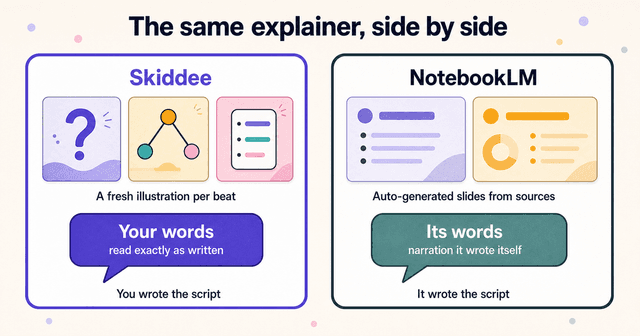
In Skiddee, that script went in as-is, with a custom illustration style and the Social media casual (Male) voice on ElevenLabs v3 at 1.1x speed. Every beat in the writing got its own fresh illustration: the unsolved conjecture sitting there, the AI exploring the problem space, the server rack humming in the dark. The narrator reads those exact words with those exact pauses. The ellipsis in "It just... sat there" lands the way it was written to. The pacing follows the script because the script is the spine of the video.
Now the same project in NotebookLM. You can't paste this script as narration at all, because there's nowhere to paste it. What you'd do instead is feed NotebookLM source articles about the mathematical result and ask for a Video Overview. It would read those articles and write its own narration over auto-generated slides. The hook, the phrasing, the "It just... sat there" beat, all of that would be NotebookLM's choices, not yours. The output is a narrated slide deck in one of its preset styles (Classic, Whiteboard, Watercolor, and a few others), pulling images and quotes from the documents you fed it. To be clear, we didn't generate a NotebookLM video of this topic; this is what its documented format does with this kind of material. It would probably be a fine way to understand the story. It's the wrong tool for publishing your version of it.
| Skiddee output | NotebookLM output | |
|---|---|---|
| Narration | Your script, verbatim | NotebookLM's own summary of your sources |
| Visuals | A fresh illustration per script beat | Auto-generated slides from your documents |
| Editability | Tweak scenes, regenerate images, fix narration | None |
| Voice | Your pick from ElevenLabs voices, adjustable speed | NotebookLM's voice |
| Where you'd publish it | YouTube, TikTok, your course, a client | Your own notes, maybe a team channel |
| Limits | Credits (about $1.30 per minute of video) | Daily caps (3 a day on the free tier) |
How do pricing models compare?
NotebookLM's video generation is bundled with Google's AI plans and metered by daily quotas. The free tier allows 3 Audio Overviews and 3 Video Overviews a day. Google AI Plus ($7.99/month) raises that to 6 a day, AI Pro ($19.99/month) to 20 a day, and AI Ultra (roughly $99.99 to $199.99/month) adds access to the Cinematic Video Overviews, the animated film-style format Google shipped in March 2026. Those Cinematic videos look impressive, but they're Ultra-only and still not editable.
Daily quotas suit a research habit: a few overviews a day, reset tomorrow. They're an awkward fit for production work, where you might make five videos on Tuesday and none for two weeks.
Skiddee meters by credits. The free tier gives you 1,000 credits, about 2-3 minutes of video, with no card, and credits never expire. When you need more, a one-time $15 prepaid pack buys 4,500 credits, roughly 11 minutes of finished video (about $1.30 a minute), or monthly plans start at $29 if you publish regularly. Your first purchase unlocks watermark-free videos, longer scripts, and 2K resolution.
The honest summary: if you're already paying for a Google AI plan, NotebookLM's video feature is effectively free, and that's hard to argue with for personal use. You start paying Skiddee when the output needs to be something you'd publish.
Who should pick NotebookLM?
NotebookLM is the better choice more often than a competitor's blog post usually admits.
- Students and researchers. Turning a folder of papers or lecture notes into an Audio Overview you can listen to on a walk is the killer use case, and nothing else does it as well.
- Internal recaps. A Video Overview of last quarter's research findings for your team doesn't need brand polish or exact wording. It needs to be accurate and cheap, and NotebookLM is both.
- Anyone who doesn't want to write. This is the big one. NotebookLM's whole premise is that it writes for you, grounded in your sources, with low hallucination. If a blank page is the obstacle, Skiddee can't help you and NotebookLM can.
- Turning a pile of PDFs into something listenable. The interactive audio mode, where you can interrupt the hosts and ask questions, is genuinely useful for studying.
Its weaknesses are the flip side of the same design: zero script control, output that reads as a narrated deck, no editing after generation, daily caps, no brand control, and the occasional inaccuracy. None of that matters for studying. All of it matters for publishing.
Who should pick Skiddee?
Skiddee is for people whose exact wording is the point.
- Creators publishing educational content. If you script your videos (and most good educational channels do), the narration has to be your narration.
- Faceless channels. Custom illustrations per scene, AI narration, no avatar and no stock footage. That's the format, end to end. See our faceless YouTube channel guide for the full workflow.
- Anyone who needs to edit. Regenerate an illustration, fix a sentence, swap a voice. NotebookLM's output is take-it-or-leave-it; Skiddee's isn't.
Two honest limitations. Skiddee doesn't research a topic from your documents, you bring the script. And it's an illustration style, not photoreal, so if your video needs a human face or live footage, neither tool here is your answer; our roundup of the best AI video tools for animated videos covers the wider field.
Try Skiddee free
Your first 1,000 credits, about 2-3 minutes of video, are on us. Paste a script, pick a voice and an illustration style, and Skiddee draws custom illustrations for every scene, adds AI narration, and assembles the finished video. It reads your words exactly as you wrote them.
FAQ
Can NotebookLM read my script word-for-word?
No. NotebookLM has no script input. You upload sources and it writes its own narration from them, steered only by a prompt box for focus and audience. If you need the narration to match your writing exactly, you need a script-first tool like Skiddee, which reads your script verbatim.
Is NotebookLM's video maker free?
Partly. The free tier allows 3 Video Overviews a day. Paid Google AI plans raise the daily caps ($7.99/month for 6 a day, $19.99/month for 20 a day), and the Cinematic format requires the AI Ultra tier at roughly $99.99 to $199.99 a month.
Can I edit a NotebookLM Video Overview after it generates?
No. There is no editing after generation; if the result isn't right, you adjust your prompt or sources and regenerate. Skiddee lets you edit scenes, regenerate individual illustrations, and change the narration after the first pass.
Which is better for YouTube?
Skiddee, and it isn't close. NotebookLM's output is a narrated slide deck built for understanding your own material, with no brand control and no editing. Skiddee produces an illustrated video from your script with your choice of voice, which is what a publishable YouTube video needs.
Sources
- Google — Video Overviews in NotebookLM and NotebookLM plan limits. Official feature and quota documentation.
- Google Workspace Updates — New ways to customize and interact with your content in NotebookLM. Cinematic Video Overviews announcement.
About the author
Suyin Kee is Co-founder of Skiddee, an AI tool that turns scripts into illustrated animated videos. She writes about faceless video, creator economics, and AI tooling for educators.