Key takeaways
- Both tools follow your script word-for-word. The difference is what's on screen: HeyGen puts a photorealistic avatar in front of the camera, Skiddee draws a fresh custom illustration for every scene.
- HeyGen's $29/mo Creator plan looks cheap until the credit burn kicks in. Its lifelike Avatar IV costs 20 credits per minute, so ten one-minute videos can push real spend toward $59/mo. Skiddee starts free, offers $15 top-ups for occasional use, and has monthly plans from $29 for regular publishing.
- Pick HeyGen if you need a human presenter, localization at scale, or UGC-style ads with a face. Pick Skiddee if you want illustrated explainers, faceless content, or training videos without the corporate-avatar feel.
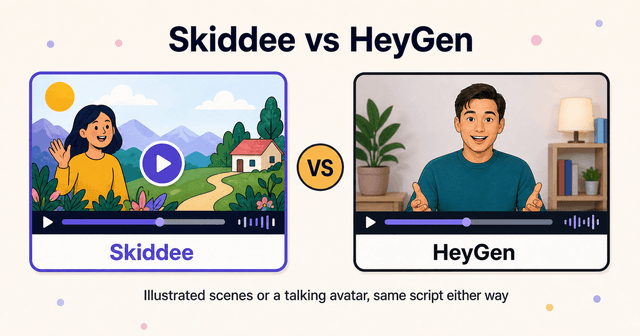
Here's the difference in two sentences. HeyGen turns your script into a photorealistic digital human reading it to camera; Skiddee turns the same script into an animated video with custom illustrations drawn for every scene. Both stick to your words verbatim, so the choice comes down to what you want on screen.
What's the difference between Skiddee and HeyGen?
HeyGen is the leading AI avatar platform. You type a script, pick from 700+ stock avatars (or clone yourself as a "digital twin"), and a photorealistic digital human speaks your words to camera with best-in-class lip-sync. The output is a talking-head presenter video, the kind you see in corporate training, UGC-style ads, and product announcements. It supports 175+ languages with translation and dubbing, and it scores a strong 4.8/5 on G2.
Skiddee never puts a person on screen. It generates a custom illustration for every scene in your script (never stock, never an avatar), adds ElevenLabs AI narration, and assembles the finished video in one click. The output is an illustrated explainer with a deliberate visual style.
The short version, at a glance:
| Skiddee | HeyGen | |
|---|---|---|
| Format | Illustrated animated video | Photorealistic avatar presenter |
| Visuals | Custom illustration per scene | 700+ stock avatars, digital twins, photo avatars |
| Script fidelity | Word-for-word | Word-for-word (TTS drives lip-sync) |
| Pricing model | Free credits to start, then $15 top-ups or monthly plans | Subscription tiers, credit-metered |
| Free tier | 1,000 credits, no card; watermark until a first purchase | 3 videos/mo, max 1 minute, watermarked |
| Best for | Explainers, faceless channels, illustrated training | Presenter-led training, localization, UGC ads |
Neither is a footage editor. If you filmed something and want to cut it, both are the wrong tool.
The same script, side by side
The cleanest way to compare them is one script, two formats. Here's a real one from our account: a corporate cybersecurity training video called "Sam the cybersecurity nightmare." It's a deadpan narrated story about an employee doing everything wrong. Sam panic-clicks a phishing email, reuses one password everywhere, emails a spreadsheet full of personal data to the wrong person, works on café Wi-Fi, and leaves a laptop unlocked with confidential papers on the desk. It ends with "Don't be Sam" and the corrected behaviors.
A few lines from the script:
Sam's password? "Sam123." Bold. Minimalist. Extremely hackable.
Sam clicks anyway. Because nothing says "secure" like panic-clicking a random link.
Don't be Sam.
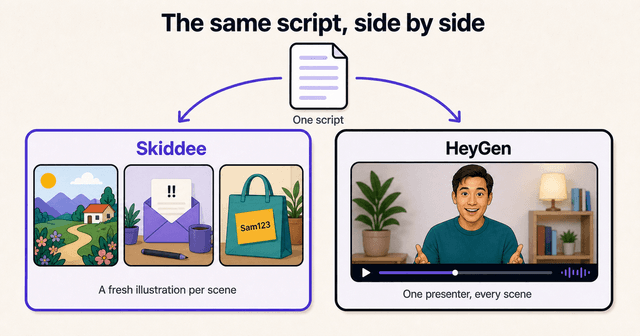
What Skiddee produced. We ran this script with the Fun Sticker Collage illustration style and the Explainer (Male) voice on ElevenLabs v3 at 1.1x speed. Every scene got its own fresh sticker-collage illustration matched to the line being narrated: Sam hunched at the laptop, the sketchy email with its screaming subject line, the "Sam123" password on a sticky note, the café with the open Wi-Fi. The narration delivered the jokes deadpan, word-for-word, and the whole thing assembled automatically. The visuals do the comedic work the script sets up, because each gag gets its own picture.
What the same script does in HeyGen. To be clear, we did not run this script through HeyGen, so this is what its documented avatar format produces with a script like this one. You'd get a photorealistic presenter reading the same words to camera against a template background. The lip-sync would be excellent. But the format changes what the script can do. The jokes land differently when a corporate avatar deadpans "Bold. Minimalist. Extremely hackable." with a fixed pleasant expression. Scene directions like "[Zoom in: sketchy sender address]" have no visual equivalent, because the visual is always the presenter. And at a couple of minutes of runtime, this script sits right around the ~2-minute mark where HeyGen reviewers report lip-sync starting to drift.
| Skiddee output | HeyGen output | |
|---|---|---|
| Visuals | Fresh illustration per scene (Sam, the email, the password, the café) | One presenter, template background, throughout |
| Narration | ElevenLabs voice, word-for-word | Avatar TTS with lip-sync, word-for-word |
| Scene directions | Each becomes its own illustration | Dropped; the visual is always the presenter |
| Free-tier limits | 1,000 starting credits; watermark until a first purchase | Watermarked, capped at 1 minute (this script wouldn't fit) |
| Render-to-edit loop | Edit a scene, regenerate just that illustration | Re-render the avatar take; reviewers on Trustpilot report credits lost on failed renders |
Neither output is wrong. They're different videos. If your training content needs a trusted human face delivering policy, the avatar is the point. If your script paints pictures, you want a tool that paints them.
How do pricing models compare?
HeyGen's published tiers: Free at $0 (3 videos a month, one minute max, watermarked), Creator at $29/mo ($24 annual) with 600 credits, voice cloning, and watermark removal, Pro at $49/mo with 4K, and Business at $149/mo plus $20 per seat.
The catch is the credit burn. The older Avatar III renders at 3 credits per minute but looks stiffer. The lifelike Avatar IV and V cost 20 credits per minute. At that rate, ten one-minute Avatar IV videos a month outruns the Creator plan's 600 credits once you account for retries, pushing real spend toward $59/mo. Reviewers also complain about credit-system opacity and credits lost on failed renders; HeyGen's Trustpilot score sits at 2.3/5, mostly over billing and support friction. Its G2 score of 4.8/5 tells you the product itself is good. The billing experience is where people get burned.
Skiddee's free tier gives you 1,000 credits, about 2-3 minutes of video, no card required, and credits never expire. When you need more, a one-time $15 prepaid pack buys 4,500 credits, roughly 11 minutes of finished video (about $1.30 a minute), or monthly plans start at $29 if you publish regularly. Your first purchase also unlocks watermark-free videos, longer scripts, and 2K resolution.
Who should pick HeyGen?
HeyGen is genuinely the better tool in three cases:
- You need a human presenter. For compliance training, executive comms, or anything where a face builds trust, HeyGen's avatar realism and lip-sync are the best available. No illustration style substitutes for that.
- You localize at scale. 175+ languages with translation and dubbing is a real moat. If one video needs to ship in twelve markets, HeyGen was built for exactly that.
- You make UGC-style ads. Performance marketers use HeyGen to generate creator-style talking ads in volume. Skiddee has no equivalent, because there's no face.
Two honest caveats even within those cases: photo avatars tend to get uncanny past about 15 seconds, and lip-sync degrades on videos over roughly 2 minutes, per user reviews. Keep avatar videos short and you'll be fine.
Who should pick Skiddee?
Skiddee fits when a person on camera is the wrong choice, or just not your style:
- Faceless creators. YouTube channels, TikTok explainers, anywhere you want a distinct visual identity without your face attached. Our guide to starting a faceless YouTube channel covers the full playbook.
- Explainer videos. When the script describes things (a process, a product, a story), illustrations can show each thing. A presenter can only talk about them.
- Training without the corporate-avatar vibe. The "Sam" video above is corporate training, but it doesn't feel like it. If your team groans at avatar videos, an illustrated one gets watched.
- Occasional creators. One-time top-ups mean a quiet month costs nothing, and unused credits never expire.
And the honest limitation: Skiddee is an illustration style, not photoreal. There's no real human face on screen, and it's not an editor for footage you filmed. If those matter, see the HeyGen section above, or our wider roundup of the best AI video tools for animated videos for the full field.
Try Skiddee free
Your first 1,000 credits, about 2-3 minutes of video, are on us. Paste a script, pick a voice and an illustration style, and Skiddee draws custom illustrations for every scene, adds AI narration, and assembles the finished video. No avatar, no stock footage, no card.
FAQ
Is HeyGen or Skiddee cheaper for occasional videos?
Skiddee, in most cases. HeyGen's free tier watermarks videos and caps them at one minute, and its paid plans are subscriptions where lifelike avatars burn 20 credits per minute. Skiddee starts with 1,000 free credits, then one-time $15 top-ups buy about 11 minutes of video and never expire; monthly plans are available if you publish regularly.
Does Skiddee have avatars?
No, and that's deliberate. Skiddee never puts a person or avatar on screen. It draws a custom illustration for every scene of your script instead. If your video needs a photorealistic human presenter, HeyGen is the better fit.
Which tool follows my script exactly?
Both do. HeyGen's avatar speaks your script verbatim via text-to-speech lip-sync, and Skiddee's narration sticks to your script word-for-word. The difference is the visuals: HeyGen always shows the presenter, while Skiddee builds a new illustration around each line.
Can I switch from HeyGen to Skiddee?
Yes, and it's easy because both start from a script. Paste the same script you used in HeyGen into Skiddee, pick a voice and an illustration style, and you get an illustrated version of the same video. Skiddee's free credits let you test it on a real script before paying anything.
Sources
- HeyGen — Pricing and credit-based pricing plans explained. Official tiers and credit burn rates.
- Trustpilot — HeyGen reviews. Source for the billing and support complaints cited above.
- G2 — HeyGen reviews. Source for the 4.8/5 product score.
About the author
Suyin Kee is Co-founder of Skiddee, an AI tool that turns scripts into illustrated animated videos. She writes about faceless video, creator economics, and AI tooling for educators.